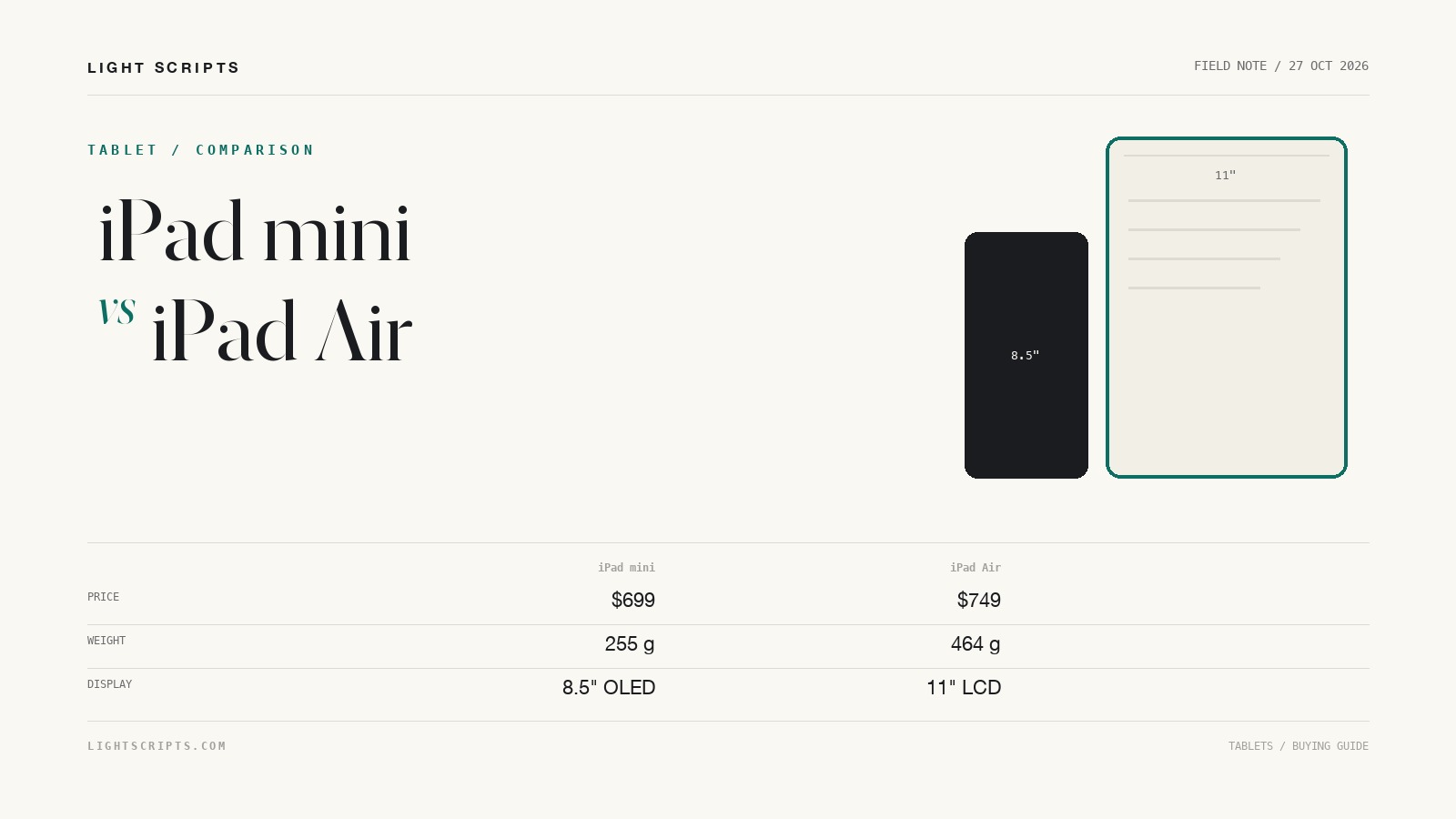
Apple announced the iPad mini 2026 on 26 October 2026, pitting it against a tablet Apple never positioned as its rival. The mini starts at $699 and the 11-inch iPad Air at $749, both 128GB Wi-Fi models. A $50 gap is not a product tier. The difference is physical: 195.3 by 132.6 mm against 247.6 by 178.5 mm, 255 g against 464 g, OLED against LCD, and only one of them takes a Magic Keyboard.
Quick answer
- Buy the mini if the tablet shares a desk with a monitor and a keyboard: about 40 square inches against 68 for the Air 11.
- Buy the 11-inch Air if the tablet becomes the computer. Apple lists Magic Keyboard support for the Air and Bluetooth keyboards only for the mini.
- The mini is the better reading panel after dark: 1 nit minimum brightness and a 2,000,000:1 contrast ratio.
- The Air is the easier second screen, at one external display up to 6K at 60Hz against 4K on the mini.
- Price is not the total. With a Pencil Pro the mini is $828 and the Air $878, neither including a keyboard case.
The $50 gap and what it actually buys
Prices as of 27 October 2026, U.S. pricing. Apple's iPad Air buy page lists the line as "From $749" and prices the 128GB Wi-Fi model at $749.00. The iPad mini buy page shows "From $699" and $699.00 for the same configuration. The launch release confirms both and adds $849 for the cellular mini and $649 with education savings.
That is 7 percent, and it buys none of the usual upgrade markers. Both start at 128GB, both have USB-C with USB 3 at 10Gb/s and DisplayPort, and both use the N1 chip with Wi-Fi 7. What the $50 buys is area, mass, and the Smart Connector.
| iPad mini (A20 Pro) | iPad Air 11-inch (M4) | iPad Air 13-inch (M4) | |
|---|---|---|---|
| Starting price | $699 | $749 | Not verified |
| Footprint | 195.3 x 132.6 mm | 247.6 x 178.5 mm | 280.6 x 214.9 mm |
| Thickness | 5.4 mm | 6.1 mm | 6.1 mm |
| Weight, Wi-Fi | 255 g | 464 g | 616 g |
| Display | 8.5-inch OLED, 2316 x 1512, 326 ppi | 11-inch LCD, 2360 x 1640, 264 ppi | 13-inch LCD, 2732 x 2048, 264 ppi |
| Chip | A20 Pro | M4 | M4 |
| Pencil | Pencil Pro and USB-C Pencil | Pencil Pro and USB-C Pencil | Pencil Pro and USB-C Pencil |
| Keyboard case | Bluetooth keyboards only | Magic Keyboard for iPad Air | Magic Keyboard for iPad Air |
The Air 13 price is marked unverified: Apple lists one starting price for the Air line.
Desk footprint: 195 x 133 mm against 248 x 179 mm
Apple fit an 8.5-inch display into the previous mini's footprint by thinning the bezels 24 percent. That is why the mini is small in a way the Air is not.
| iPad mini | Air 11 | Air 13 | |
|---|---|---|---|
| Surface area, calculated | 40.1 sq in | 68.4 sq in | 93.4 sq in |
| Multiple of the mini | 1.0 | 1.70 | 2.33 |
| Extra width over the mini | none | 52.3 mm | 85.3 mm |
| Extra depth over the mini | none | 45.9 mm | 82.3 mm |
The mini fits in the gap between a 27-inch monitor's foot and the keyboard. The Air 11 in the same gap is 52 mm short before you make room for the monitor's base, and the Air 13 needs 93 square inches of clear surface.
Footprint also sets the angle. A tablet propped at 60 degrees needs depth behind it, and the mini's 132.6 mm leaves room for a stand before the tablet reaches the keyboard. The Air 11's 178.5 mm pushes the stand back toward the monitor. The compact keyboard guide covers how much width a keyboard needs before you commit the same rectangle twice.
Weight, thickness, and the stand question
The mini is 255 g, the Air 11 is 464 g, and the Air 13 is 616 g, so the Airs add 209 g and 361 g to whatever holds the tablet up. Thickness runs the other way: 5.4 mm against 6.1 mm.
Weight matters most on a clamp or a folding stand. A light tablet is easier to raise to eye level and less likely to tip a stand backward, and a tablet on a stand shares a laptop's problem with weight distribution. The laptop stand guide applies here.
The bodies differ elsewhere. The mini is rated IP67 for water and dust; Apple's Air spec sheet lists no rating.
OLED on the iPad mini 2026 against the Air's LCD
The mini's 8.5-inch panel is OLED: 2316 by 1512 at 326 ppi, 600 nits full-screen SDR, 1200 nits peak for HDR, a 1 nit minimum, and a 2,000,000:1 contrast ratio. The Air 11 is an LED-backlit IPS LCD at 2360 by 1640, 264 ppi, and 500 nits. The Air 13 is the same LCD at 2732 by 2048 and 600 nits.
Two facts follow. The mini has the higher pixel density, 326 against 264, so text is drawn more finely even with fewer pixels in total. The Air 11 is dimmer at 500 nits, while the 13-inch matches the mini's 600.
The 1 nit floor, plus pixels that switch off instead of glowing gray, is the difference between comfortable reading in a dark room and reading at the lowest backlight. If your desk becomes a sofa after 10pm, the mini wins outright. If it faces a window at noon, the Air's LCD is fine, and the nano-texture glass option on the upper mini models is the better upgrade.
A20 Pro against M4 for desk work
Apple lists the A20 Pro with a 5-core CPU and 7-core GPU at 128GB and 256GB, and a 6-core CPU with a Dual 16-core Neural Engine at 512GB. The M4 is an 8-core CPU, a 9-core GPU, 16 Neural Engine cores, 120GB/s of memory bandwidth, and 12GB of unified memory. Apple publishes no memory figure for the mini, so there is nothing to compare there.
The rest is about sustained work. The M4 has eight CPU cores against five on the 128GB mini and six on the 512GB model, while Apple rates both tablets at the same 10-hour battery life. For documents, spreadsheets, notes, and calls, both chips are past the point where the tablet is the limit. For long exports or anything that pins the GPU for minutes, the M4 has more headroom. Apple's A20 Pro figures compare the previous mini, not the Air.
Pencil and keyboard support are two different lists
Both support Apple Pencil Pro and Apple Pencil (USB-C), and both support hover. The Pencil compatibility page lists the Air 11-inch (M4) for both. For the mini, the launch release and the mini spec page both state support for both Pencils, and those are the pages to cite; the support page predates the launch.
Keyboards separate them. Apple's compare strip on the iPad mini page reads "Supports Bluetooth keyboards". The iPad Air page reads "Supports Magic Keyboard for iPad Air". The connectors agree: the Air has a Smart Connector on the back, the mini only a magnetic connector. Apple's keyboard accessory list carries Magic Keyboards for iPad Pro, iPad Air, and iPad (A16), and none for iPad mini.
The Magic Keyboard for iPad Air adds a 14-key function row, a trackpad, pass-through charging, and a cantilever hinge. The mini's own accessory is a $79 Smart Folio with no keys. A Bluetooth keyboard works, but it is a second object on the desk with its own battery and no trackpad.
Battery, charging, and the cable under the desk
The mini has 18.9 watt-hours, the Air 11 has 28.93, and the Air 13 has 36.59. Apple rates all three at up to 10 hours of web browsing on Wi-Fi or video and 9 hours on cellular, so the Air's capacity pays for the bigger panel, not more hours.
Charging is where the mini publishes more: up to 50 percent in about 30 minutes with an Apple 35W or 40W USB-C power adapter. The Air spec page lists no fast-charge figure.
On a desk, that comes down to one cable. Both support DisplayPort over USB-C, and the mini needs the cable less often.
Second screen, notes device, or primary tablet
As a second screen, the Air has the stronger claim: one external display up to 6K at 60Hz against 4K. A second screen only helps if it fits. Forty square inches fits beside a monitor; 68 competes with it. Read the monitor guide before deciding a tablet replaces a panel, because viewing distance rules do not change when the screen detaches.
As a notes device, the mini has the better ergonomics and the Air the better canvas. 255 g at 8.5 inches is comfortable in one hand; 464 g at 11 inches is a lap or table device. Both take Pencil Pro, so squeeze and barrel roll decide nothing.
As a primary tablet, the Air wins on one fact: the Magic Keyboard. A tablet that cannot attach to a hinged keyboard with a trackpad is a tablet plus a separate keyboard, which means more cables and footprint. If the tablet is the computer, the keyboard case matters more than the $50.
Frequently asked questions
Is the iPad mini 2026 cheaper than the iPad Air?
Yes. The mini starts at $699 for 128GB Wi-Fi and the 11-inch Air at $749, a $50 gap at those prices. The cellular mini is $849.
Does the iPad mini 2026 work with a Magic Keyboard?
No. The mini page lists Bluetooth keyboard support, its spec sheet has no Smart Connector, and Apple's keyboard list has no Magic Keyboard for iPad mini.
Which screen is better for reading in the dark?
The mini's OLED, with a published 1 nit minimum brightness and a 2,000,000:1 contrast ratio. The Air's spec sheet publishes no minimum brightness, and an LED-backlit LCD keeps the whole panel lit.
Can the iPad mini 2026 drive an external monitor?
Yes, one display up to 4K at 60Hz over USB-C. Apple says iPadOS 27.2 adds extended display mode, so the external screen shows different apps. The Air supports 6K.
How much heavier is the iPad Air to hold?
The Air 11 is 464 g and the Air 13 is 616 g, against 255 g for the mini. The Airs are also thicker: 6.1 mm against 5.4 mm.
Sources and further reading
- Apple Newsroom, Apple gives iPad mini its biggest update ever, 26 October 2026. Prices, the $79 Smart Folio, Pencil pricing.
- Apple, iPad mini technical specifications. Dimensions, weight, panel figures, A20 Pro cores, Pencil support.
- Apple, iPad Air technical specifications. Both sizes, weight, LCD brightness, the M4, Smart Connector.
- Apple, Shop iPad Air. The "From $749" starting price.
- Apple Support, Apple Pencil compatibility. Pencil Pro and USB-C Pencil for the Air 11-inch (M4).
- Apple, iPad mini. The compare strip: Bluetooth keyboards, not Magic Keyboard.