Quick answer
- Length target: Set the harness length to maximum standing height plus 15 cm (6 inches) of slack.
- Base weight: Choose a base plate of at least 800 g (1.8 lbs) so the bottom remains planted when raising the desk.
- Channel separation: Run AC mains lines in dedicated outer compartments away from display and data cables.
- Minimum bend radius: Keep cable curves greater than 4 times the cable outer diameter to prevent core breakage.
A height-adjustable desk creates a mechanical problem that fixed desks never have: the distance between the tabletop and the wall outlet changes by 40 to 60 cm multiple times a day. If you bundle cables into a loose drop or a rigid sleeve, three failure patterns regularly emerge: plugs get yanked out of wall sockets at full extension, cords pinch in frame crossbars during descent, or motor safety sensors trip due to friction and strain.
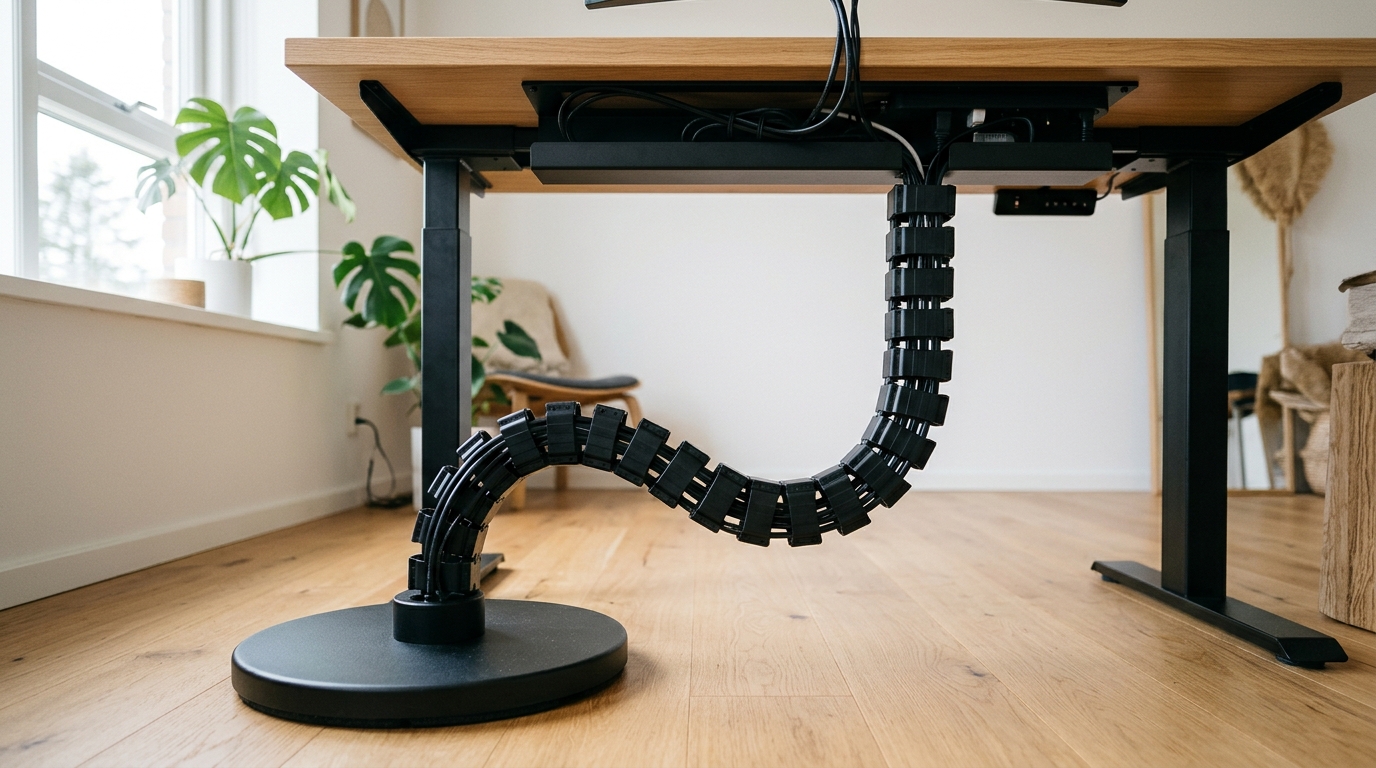
A standing desk cable harness—specifically an articulated vertebrae cable spine (a segmented modular column that folds and expands along a single vertical axis)—solves this by controlling exactly where and how cables flex.
Vertebrae spine vs flexible sleeve: which handles desk motion?
Before buying hardware, decide between a segmented vertebrae spine and a flexible fabric sleeve. Both bundle wires, but they behave differently when a desk moves.
| Feature | Articulated Vertebrae Spine | Flexible Fabric / Mesh Sleeve |
|---|---|---|
| Movement control | Folds along a defined vertical track | Bends unpredictably; can bow outward |
| Floor anchoring | Heavy steel or cast-iron base plate | Floats loose or requires adhesive floor clips |
| Internal partitioning | 2 to 4 isolated longitudinal channels | Single shared cavity |
| Modularity | Snap-together links; add or remove segments | Cut-to-length with scissors or heat knife |
| Best suited for | Open-frame sit-stand desks with floor drops | Desks with fixed-height rear modesty panels |
A flexible mesh or neoprene sleeve is cheaper and lighter, but it possesses no vertical rigidity. When the desk drops from standing height to seated height, the sleeve bows outward into knee space or bunches underneath the desk frame.
An articulated vertebrae spine uses interlocking plastic segments (usually injection-molded ABS) that hinge in only one plane. The links collapse into each other like an accordion during descent and extend smoothly during lift, keeping the umbilical bundle aligned directly underneath the mounting bracket.
How much cable slack do you actually need at full height?
The most expensive mistake in standing desk wiring is sizing cables for the seated position.
To determine correct cable length and harness link count:
- Raise the desk to its absolute maximum limit. Even if your personal standing height is 108 cm, someone else may raise the desk to its 125 cm ceiling, or an automatic reset cycle may drive the legs to the upper travel stop.
- Measure the route from the under-desk power strip to the floor socket. Do not measure as a straight diagonal line. The harness must drop vertically from the top mount to the floor, then run horizontally along the baseboard.
- Add 15 cm (6 inches) of safety margin. Cables tighten as they twist inside a conduit. That 15 cm margin prevents connectors from sustaining axial tension (a straight pulling force on terminal pins).
- Check the minimum bend radius. For standard copper data cables (such as Cat6 Ethernet or HDMI 2.1), the minimum bend radius (the tightest circular curve a cable can withstand without signal degradation) is four times the outer diameter. For fragile fiber optic display cables, maintain at least ten times the diameter.
If a power cord from an appliance cannot reach the under-desk power strip with 15 cm of slack to spare, do not stretch it. Mount a master power distribution strip directly under the tabletop so that only a single heavy-gauge mains cord travels through the spine to the wall.
Why separating power and data channels prevents interference and snags
Commercial articulated spines feature internal dividers dividing the interior into two or four isolated chambers.
Running all cables through a single unpartitioned void causes two distinct issues:
- Electromagnetic interference (EMI): High-current AC power cables (alternating current supplying monitors and charging bricks) emit magnetic fields. When unshielded USB audio, microphone lines, or video cables run pressed against AC cords over a 1.2-meter parallel drop, audible ground hum or monitor flickering can occur.
- Unequal mechanical friction: Thick 14 AWG rubberized power cords grip and drag against thin braided USB cords. When the spine collapses, the thicker cable can snag the thinner cable, pulling it out of its socket.
Assign one outer channel strictly to AC power cords. Reserve the opposing channel for DisplayPort, HDMI, and USB connections. Keep any network Ethernet patch cables in a separate quadrant.
What base weight is required to stop the spine from tipping?
An unanchored cable spine defeats its purpose. As the desk rises, the friction of the cables sliding through the segments pulls upward on the entire assembly.
Quality spines use a circular cast-iron or pressed steel base plate weighing between 800 g and 1200 g (1.8 to 2.6 lbs).
- Under 600 g: The base plate will lift off the floor when the desk reaches standing height, causing the spine to swing like a pendulum and strike your shins.
- 800 g to 1200 g with rubber feet: The base remains firmly planted on hardwood or low-pile carpet, guiding the vertebrae into a neat vertical stack as the desk lowers.
- Direct floor anchoring: In commercial environments or active households with pets, select a base plate with countersunk screw holes to anchor the foot directly into the floor or baseboard trim.
Step-by-step checklist before cycling the desk for the first time
Complete this sequence before plugging devices into wall power:
- Top bracket firmly screwed: Secure the top mounting flange into the underside of the desktop using screws that penetrate at least 12 mm (confirm your tabletop thickness first to avoid punching through the surface).
- Power strip mounted under desk: Mount your master surge protector to the tabletop frame so only one mains power cable passes down the harness.
- Snap segments to fit: Remove or add individual vertebrae links so the spine touches the floor with a slight curve at minimum seated height, without bunching sideways.
- Separate channels assigned: Route AC power down the left partition and display/data lines down the right partition.
- Strain relief collars secured: Fasten a velcro strap or cable clamp at both the top mounting bracket and the bottom exit point so pulling forces cannot transfer to plugs.
- Manual dry run: Slowly raise the desk to maximum height while watching the harness. Confirm no cable pulls taut. Then lower the desk to minimum height and verify the links stack without catching on desk legs.
If the free fixes are not enough
| Your Situation | The Limitation | What to Look For |
|---|---|---|
| Desk moves between 65 cm and 125 cm height | Sleeves and clips pull taut or drag across the floor | Articulated 4-channel vertebrae spine with 130 cm total length and snap-off links |
| Heavy bundle with two monitors, PC, and audio gear | Standard 50 mm spines cannot fit multiple thick display cables | Wide-track cable spine (70 mm to 75 mm link width) with quad internal dividers |
| Slick hardwood or laminate flooring | Light plastic bases slide around when the desk changes height | Cast-iron weighted base (minimum 900 g) with non-slip silicone bottom padding |
| Rental office where you cannot screw into the floor | Base plate shifts when bumped by vacuum cleaners or feet | Magnetic base attachment or clamp-on desk leg cable guide channel |
Sources and citations
- ANSI/BIFMA X5.5-2021 (Desk and Table Products): Industry safety and durability standards specifying stability, mechanical strength, and clearance boundaries for height-adjustable commercial tables.
- BIFMA G1-2017 (Ergonomics Guideline for Furniture): Recommended height ranges (57 cm to 124 cm / 22.6" to 48.7") and movement clearances for sit-stand workstations.
- OSHA Computer Workstations eTool (Good Working Positions): Guidance on routing office equipment power cables to eliminate trip hazards and mechanical pinch points.
- StarTech Commercial Sit-Stand Cable Management Spine (CMVBMOD Specifications): Technical specifications on modular snap-together ABS vertebrae dimensions (1,290 mm extended length) and steel weighted base plate engineering.
- National Electrical Code (NFPA 70, Article 400): Regulations governing flexible cord protection against physical damage and strain relief requirements at termination points.
Frequently asked questions
- How long should a standing desk cable harness be?
- A standing desk cable harness must span your desk's maximum extended height (typically 120 cm to 130 cm for standard BIFMA-compliant frames) plus an additional 15 cm of routing slack to prevent cable tension at full extension.
- Why do articulated cable spines have separate internal channels?
- Separate channels isolate high-voltage AC mains power cords from low-voltage USB, Ethernet, and video cables, eliminating electromagnetic interference (EMI) and preventing thicker power cables from crushing delicate display lines.
- Is a weighted base necessary for an under-desk cable spine?
- Yes. A weighted steel or cast-iron base plate weighing between 0.8 kg and 1.2 kg keeps the bottom segment anchored to the floor so the spine folds and unfolds along a predictable vertical path rather than swinging into your legs.